Introduction
Scaling the performance of any type of application is one of our specialties at Net7.
PHP applications are still quite common, from Wordpress, Joomla and other content management systems up to custom dev using Symfony or Laravel.
We'll demonstrate an easy way to scale such applications starting from a single server with minimal friction.
THe "LAMP" stack
The notion of LAMP stack is rather old and a bit out of fashion.
What it used to mean was:
- Linux (OS)
- Apache (web server)
- MySQL (relational database)
- PHP (app engine / programming language)
Linux is still running most of the web today, Apache has fallen out of grace a bit but has support for .htaccess files (at the cost of performance as we discussed in another article) and a vast ecosystem of modules to do just about anything.
When hosting a PHP application the bottleneck is never going to be whatever web server is in front of it (unless the PHP Apache module is being used but we'd strongly recommend against that).
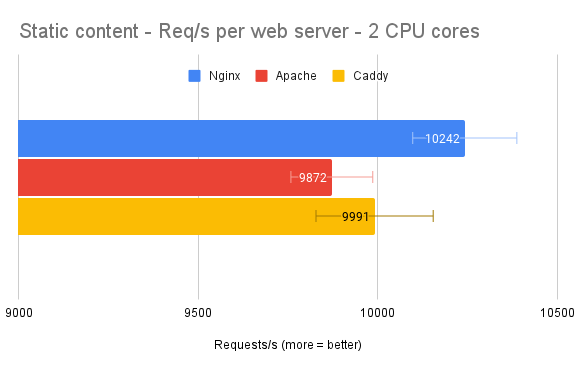
To illustrate, here are performance results from another article, with the static content graph here below (requests per seconds):
To be compared to a naked Symfony PHP application:
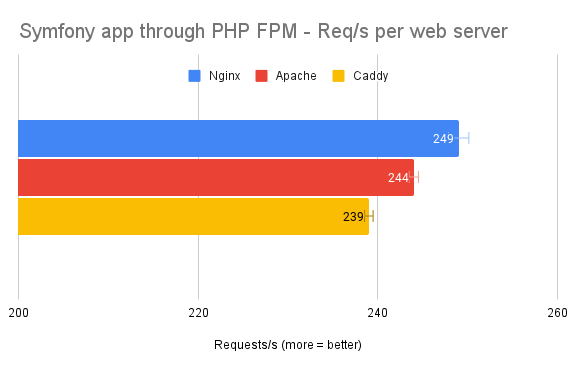
As you can see web servers without runtimes are plenty fast enough.
While we're on the subject of web servers, we also sometimes use these projects:
- Nginx — The fastest with smallest memory footprint, has a great memory caching system - Guides and AI tend to recommend it so that also adds to its popularity, often technically the fastest though it doesn't make much difference for PHP hosting in the end;
- Caddy — The easiest to configure, has its own Letsencrypt challenge system built in, probably the safest due to Golang's memory management (garbage collection) but uses more memory as a drawback.
Regarding the database system, the most popular today is MariaDB, a fork of MySQL that is almost one to one compatible with it.
The PHP runtime used to be the PHP Apache module though most PHP users haved moved away from using it for a while and for good reasons.
The most compatible and non-exotic way to run PHP becomes FPM but it's not the hottest nor the only way as we've explored on this very blog.
Distributing the load
The normal monolithic server stack looks like this:
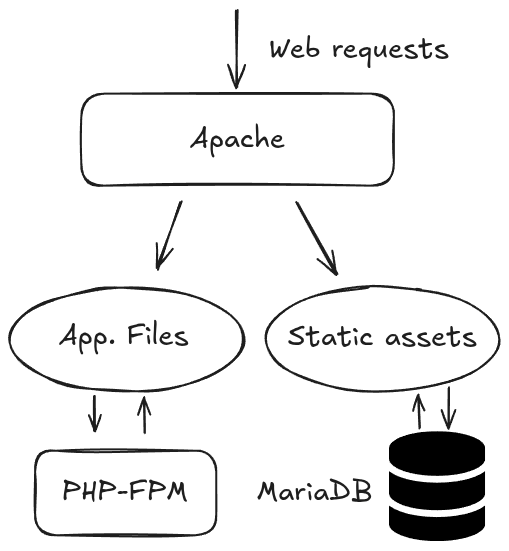
Both Apache and the PHP runtime need to be able to access the .php files.
Static assets are best served by Apache directly but the PHP runtime often needs to access them as well.
Any way to avoid going through the PHP runtime is always nice to have.
We want to create one or more disposable worker nodes while keeping the original monolithic server as the main entrypoint and sufficient to serve the apps by itself.
That means the main server has to be the sole owner of the database and application files, as well as static assets unless there's a specific solution for that such as a CDN or dedicated domain.
The easiest way to solve these needs are:
- Using socat on the worker node to redirect local database connection to the main server, app files can still use "localhost" or 127.0.0.1 in their connection strings;
- Serving the app files through NFS on the main server.
Here's a chart showing a single node setup:
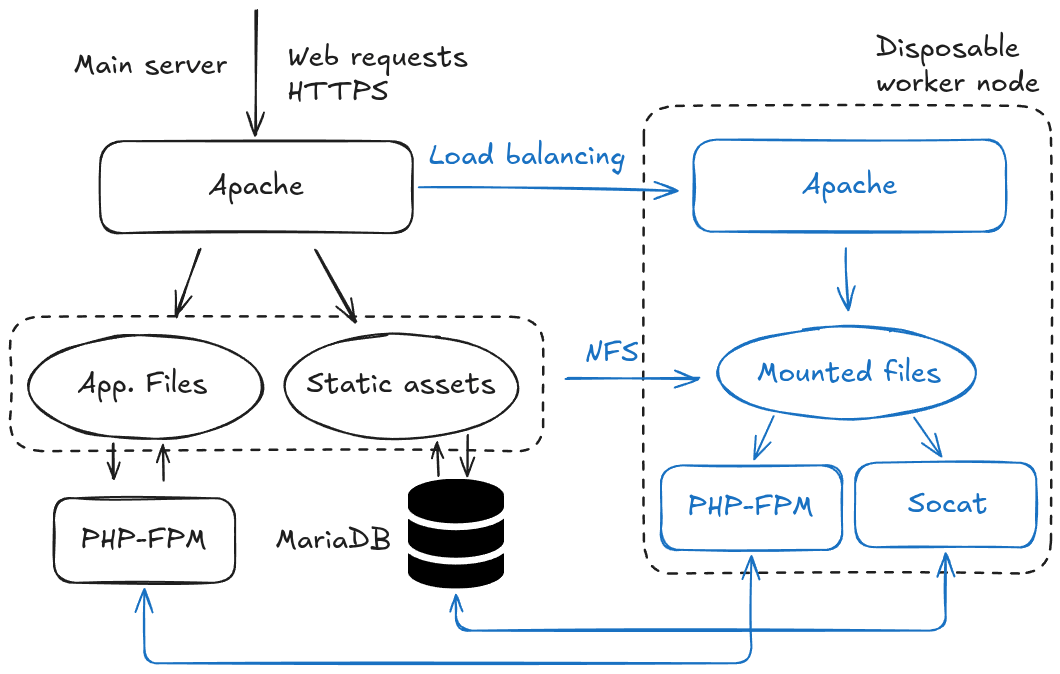
These communications should be safely locked between the relevant servers only in a private network but we'll leave security concerns out of this article.
Worker nodes do not need to be available from the internet nor is there any reason to connect to them using SSH.
Editing the worker node config and system should be done through some CI/CD pipeline.
Regarding NFS, every member is able to read and write. We've never had any trouble with how NFS handles concurrent IO which is why we use it. It also recovers quickly with no human intervention needed in case of unavailability of the main server.
Administrative operations that could be heavy on file storage should be done on the main server, as with pretty much any maintenance operation (cronjobs, etc.).
Load balancing
Apache and other web servers all have some way to load balance traffic dynamically to different servers, providing SSL/TLS termination for these websites as well.
They should be able to detect when a load balanced node is unable to respond for whatever reason, assign weights so that more requests go to a separate node and being able to immediately add new nodes to the stack.
PHP sessions concerns
PHP sessions are normally stored in files somewhere on the server. We can't really load balance PHP apps with sessions using local session storage.
Unless we find a way to remember which node has been serving which client, for instance using a cookie.
However, for a session-heavy application we'd recommend storing sessions in the database or using another custom session handler (like Redis).
Although, to be honest, the easiest session sharing can be done with another NFS export from the main server.
Example load balancing config
We'll show an example Apache config snippet that can balance requests between the main server and a disposable node on a private network, here being at 192.168.200.2.
RequestHeader set "X-Forwarded-Proto" expr=%{REQUEST_SCHEME}
RequestHeader set "X-Forwarded-SSL" expr=%{HTTPS}

Header add Set-Cookie "ROUTEID=.%{BALANCER_WORKER_ROUTE}e; HttpOnly; Secure; path=/;" env=BALANCER_ROUTE_CHANGED
<Proxy "balancer://APP_NAME">
  BalancerMember "http://127.0.0.1:8888" route=1
  BalancerMember "http://192.168.200.2:8888" loadfactor=2 route=2
  ProxySet stickysession=ROUTEID
</Proxy>

ProxyPreserveHost On
ProxyPass "/" "balancer://APP_NAME/"
ProxyPassReverse "/" "balancer://APP_NAME/"
That snippet should be part of the main HTTPS endpoint for that application on the main server.
We then need a separate virtual host on port 8888, which can hold the exact same config on the main server and the worker nodes and has all of the PHP-related config.
The example above also has the cookie config allowing requests from the same client to be sent to the same server.
The loadfactor directive from the worker node's BalanceMember line is set to 2 to make it so that the node receives twice as many requests as the main server.
APP_NAME just matches the Proxy section where it's declared and should be modified accordingly to match your application.
Discussion
The idea was to show an example of simple horizontal scaling but we deploy similar solutions for other application runtimes.
Don't hesistate to contact us with your specific needs on any hosting platform, we might be able to help you out.
The example presented in the current article doesn't provide any high availability since everything is going through the main server which also has the database.
It's not impossible to transition to high availability on top of the horizontal scaling, behind a service like CloudFlare or an in-house dedicated load balancer, with any type of database system at controlled infrastructure costs taking into consideration risks that make sense for the business at hand.